CollegeNET Formbuilder and CRM

CollegeNET Formbuilder and CRM

CollegeNET Formbuilder and CRM

CollegeNET Formbuilder and CRM

While at CollegeNET, I worked primarily on the college admissions side of the platform, with a

strong focus on the form builder and supporting CRM tools. I designed features within a highly

complex ecosystem of data collection, conditional logic, validation rules, and large-scale

configuration. My work centered on simplifying powerful systems without sacrificing flexibility,

making intricate logic understandable, and aligning design solutions closely with real technical

constraints to ensure reliable experiences for both administrators and applicants. Below are a

few examples of key features and systems I designed, highlighting my approach to solving

complex product problems.

While at CollegeNET, I worked primarily on the college admissions side of the platform, with a strong focus on the form builder and supporting CRM tools. I designed features within a highly complex ecosystem of data collection, conditional logic, validation rules, and large-scale configuration. My work centered on simplifying powerful systems without sacrificing flexibility, making intricate logic understandable, and aligning design solutions closely with real technical constraints to ensure reliable experiences for both administrators and applicants. Below are a few examples of key features and systems I designed, highlighting my approach to solving complex product problems.

While at CollegeNET, I worked primarily on the college admissions side of the platform, with a strong focus on the form builder and supporting CRM tools. I designed features within a highly complex ecosystem of data collection, conditional logic, validation rules, and large-scale configuration. My work centered on simplifying powerful systems without sacrificing flexibility, making intricate logic understandable, and aligning design solutions closely with real technical constraints to ensure reliable experiences for both administrators and applicants. Below are a few examples of key features and systems I designed, highlighting my approach to solving complex product problems.

While at CollegeNET, I worked primarily on the college admissions side of the platform, with a strong focus

on the form builder and supporting CRM tools. I designed features within a highly complex ecosystem of

data collection, conditional logic, validation rules, and large-scale configuration. My work centered on

simplifying powerful systems without sacrificing flexibility, making intricate logic understandable, and

aligning design solutions closely with real technical constraints to ensure reliable experiences for both

administrators and applicants. Below are a few examples of key features and systems I designed,

highlighting my approach to solving complex product problems.

While at CollegeNET, I worked primarily on the college admissions side of the

platform, with a strong focus on the form builder and supporting CRM tools. I

designed features within a highly complex ecosystem of data collection,

conditional logic, validation rules, and large-scale configuration. My work centered

on simplifying powerful systems without sacrificing flexibility, making intricate logic

understandable, and aligning design solutions closely with real technical

constraints to ensure reliable experiences for both administrators and applicants.

Below are a few examples of key features and systems I designed, highlighting my

approach to solving complex product problems.

Repeating Sections

Repeating Sections

Repeating Sections

Repeating Sections

Repeating Sections

Form creators often need to collect repeated sets of information (e.g., family information,

course work) without rebuilding the same fields multiple times. The Repeating Sections feature

enables dynamic, repeatable form sections while preserving data integrity and rule clarity for

both builders and applicants.

Form creators often need to collect repeated sets of information (e.g., family information, course work) without rebuilding the same fields multiple times. The Repeating Sections feature enables dynamic, repeatable form sections while preserving data integrity and rule clarity for both builders and applicants.

Form creators often need to collect repeated sets of information (e.g., family information, course work) without rebuilding the same fields multiple times. The Repeating Sections feature enables dynamic, repeatable form sections while preserving data integrity and rule clarity for both builders and applicants.

Form creators often need to collect repeated sets of information (e.g., family information,

course work) without rebuilding the same fields multiple times. The Repeating Sections feature

enables dynamic, repeatable form sections while preserving data integrity and rule clarity for

both builders and applicants.

Form creators often need to collect repeated sets of information (e.g., family

information, course work) without rebuilding the same fields multiple times. The

Repeating Sections feature enables dynamic, repeatable form sections while

preserving data integrity and rule clarity for both builders and applicants.

The Challenge:

The Challenge:

The Challenge:

The Challenge:

The Challenge:

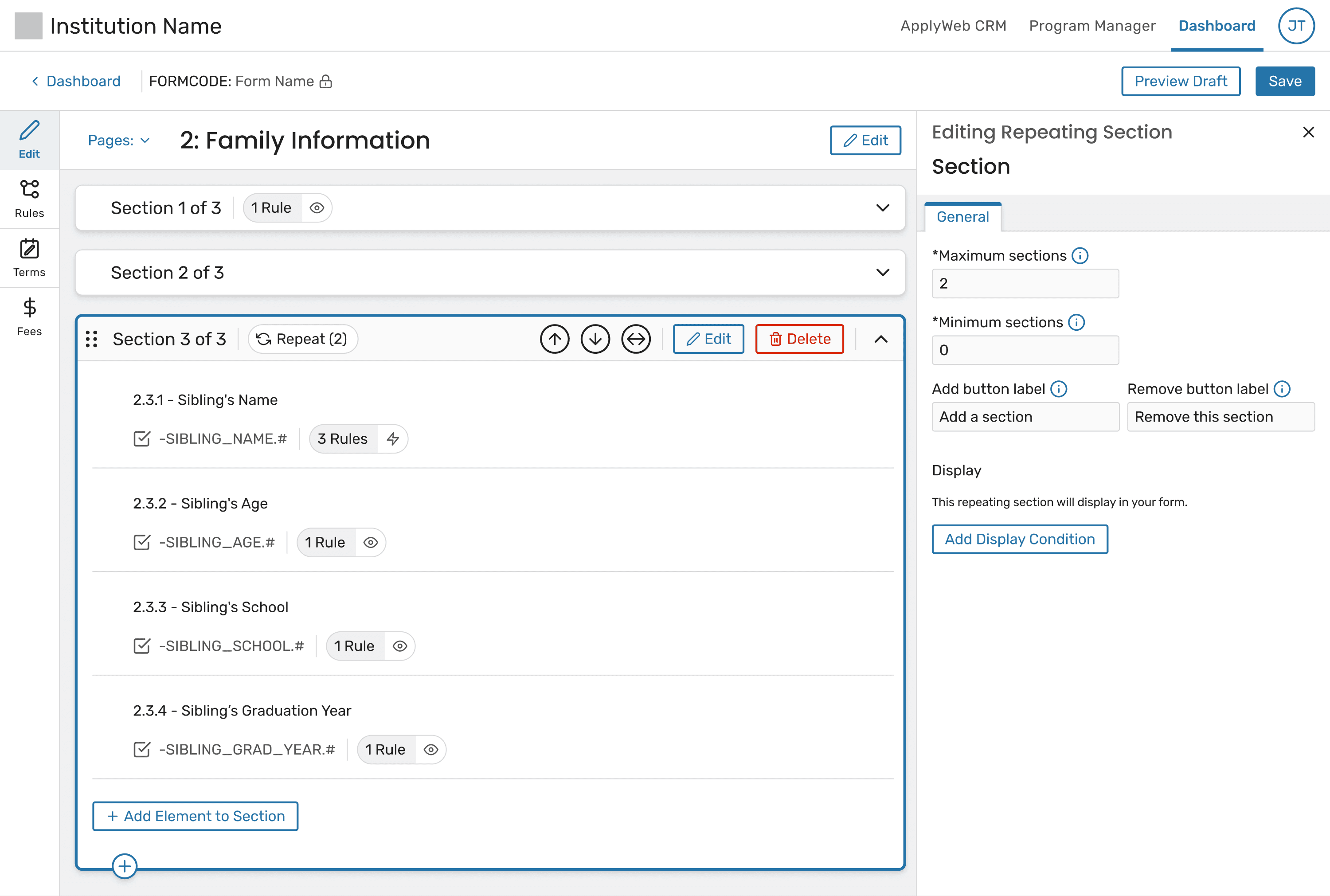
Designing Repeating Sections required solving three hard problems at once:

Designing Repeating Sections required solving three hard problems at once:

Designing Repeating Sections required solving three hard problems at once:

Designing Repeating Sections required solving three hard problems at once:

Designing Repeating Sections required solving three hard problems at once:

Avoiding confusing configuration around how many sections are shown vs. required

Avoiding confusing configuration around how many sections are shown vs. required

Avoiding confusing configuration around how many sections are shown vs. required

Avoiding confusing configuration around how many sections are shown vs. required

Avoiding confusing configuration around how many sections are shown vs. required

Supporting complex rules that apply across multiple repeated entries

Supporting complex rules that apply across multiple repeated entries

Supporting complex rules that apply across multiple repeated entries

Supporting complex rules that apply across multiple repeated entries

Supporting complex rules that apply across multiple repeated entries

Preventing partial or invalid submissions without overwhelming users with warnings

Preventing partial or invalid submissions without overwhelming users with warnings
Preventing partial or invalid submissions without overwhelming users with warnings

Preventing partial or invalid submissions without overwhelming users with warnings

Preventing partial or invalid submissions without overwhelming users with warnings

Key Design Solutions:

Key Design Solutions:

Key Design Solutions:

Key Design Solutions:

Key Design Solutions:

1. SIMPLIFIED REQUIREMENT MODEL

1. SIMPLIFIED REQUIREMENT MODEL

1. SIMPLIFIED REQUIREMENT MODEL

1. SIMPLIFIED REQUIREMENT MODEL

1. SIMPLIFIED REQUIREMENT MODEL

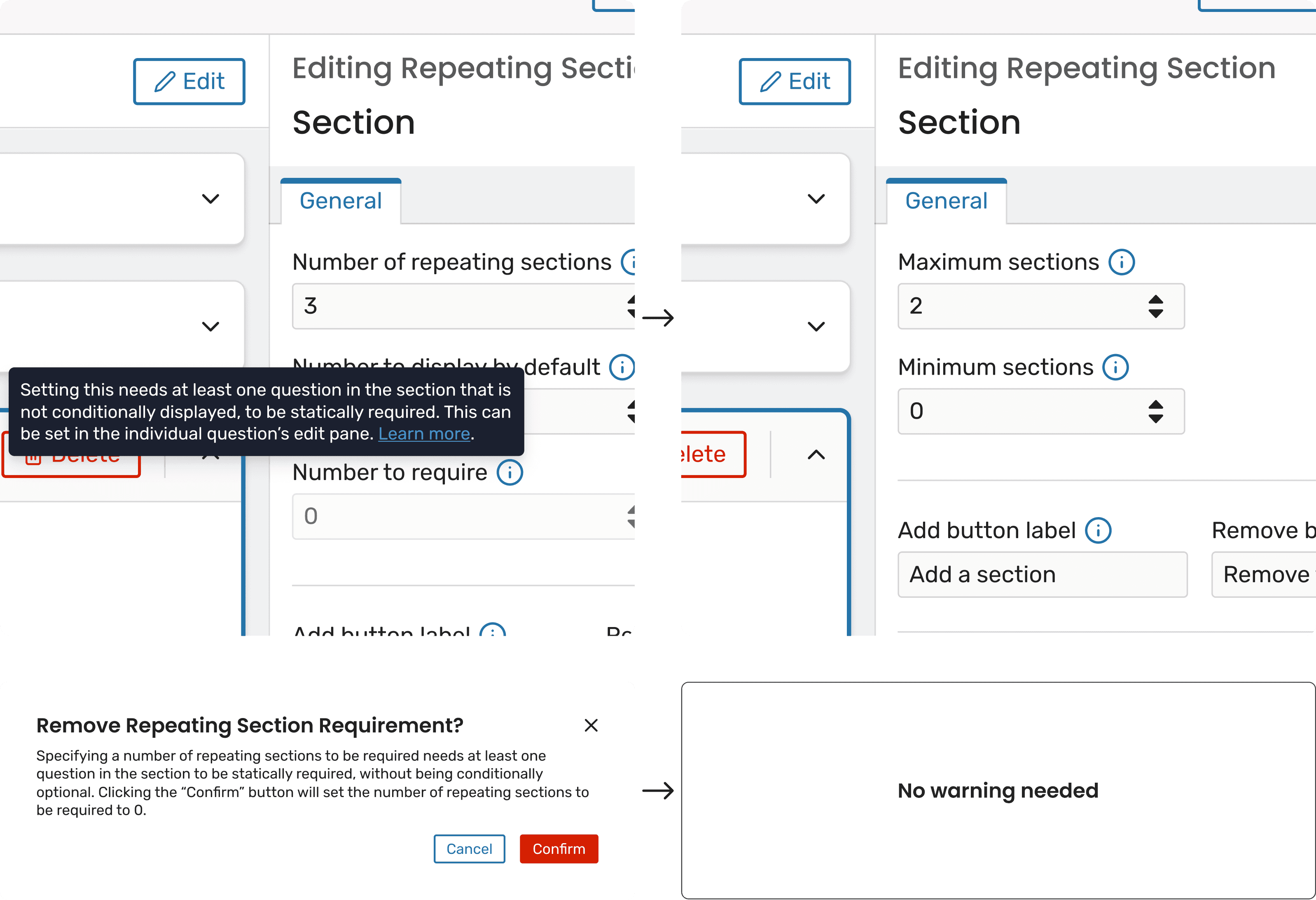
Problem: Early designs for repeating sections relied on multiple numerical controls,

such as separate fields for “number of sections to display” and “number of sections

required.” While technically flexible, this approach introduced significant confusion.

Problem: Early designs for repeating sections relied on multiple numerical controls, such as separate fields for “number of sections to display” and “number of sections required.” While technically flexible, this approach introduced significant confusion.

Problem: Early designs for repeating sections relied on multiple numerical controls, such as separate fields for “number of sections to display” and “number of sections required.” While technically flexible, this approach introduced significant confusion.

Problem: Early designs for repeating sections relied on multiple numerical controls,

such as separate fields for “number of sections to display” and “number of sections

required.” While technically flexible, this approach introduced significant confusion.

Problem: Early designs for repeating sections relied on multiple numerical controls,

such as separate fields for “number of sections to display” and “number of sections

required.” While technically flexible, this approach introduced significant confusion.

It was difficult to understand:

It was difficult to understand:

It was difficult to understand:

It was difficult to understand:

It was difficult to understand:

Which sections were required versus merely visible

Which sections were required versus merely visible

Which sections were required versus merely visible

Which sections were required versus merely visible

Which sections were required versus merely visible

Why certain required settings were overridden or reset

Why certain required settings were overridden or reset

Why certain required settings were overridden or reset

Why certain required settings were overridden or reset

Why certain required settings were overridden or reset

How removing a requirement from a single question could cascade into

unexpected system behavior

How removing a requirement from a single question could cascade into unexpected system behavior

How removing a requirement from a single question could cascade into unexpected system behavior

How removing a requirement from a single question could cascade

into unexpected system behavior

How removing a requirement from a single question could cascade

into unexpected system behavior

To compensate, the UI required increasingly complex warning modals to explain

upstream consequences—an approach that added cognitive load and still left room

for error.

To compensate, the UI required increasingly complex warning modals to explain upstream consequences—an approach that added cognitive load and still left room for error.

To compensate, the UI required increasingly complex warning modals to explain upstream consequences—an approach that added cognitive load and still left room for error.

To compensate, the UI required increasingly complex warning modals to explain

upstream consequences—an approach that added cognitive load and still left room

for error.

To compensate, the UI required increasingly complex warning modals to explain

upstream consequences—an approach that added cognitive load and still left room

for error.

Solution: We significantly simplified the model by removing the separate “Number

to require” setting altogether and allowing a single control, “Minimum Sections” (or

“Number displayed by default”), to drive both visibility and requirement.

Solution: We significantly simplified the model by removing the separate “Number to require” setting altogether and allowing a single control, “Minimum Sections” (or “Number displayed by default”), to drive both visibility and requirement.

Solution: We significantly simplified the model by removing the separate “Number to require” setting altogether and allowing a single control, “Minimum Sections” (or “Number displayed by default”), to drive both visibility and requirement.

Solution: We significantly simplified the model by removing the separate “Number

to require” setting altogether and allowing a single control, “Minimum Sections” (or

“Number displayed by default”), to drive both visibility and requirement.

Solution: We significantly simplified the model by removing the separate “Number

to require” setting altogether and allowing a single control, “Minimum Sections” (or

“Number displayed by default”), to drive both visibility and requirement.

This shift created a much more intuitive mental model:

This shift created a much more intuitive mental model:

This shift created a much more intuitive mental model:

This shift created a much more intuitive mental model:

This shift created a much more intuitive mental model:

Any section shown by default must be completed

Any section shown by default must be completed

Any section shown by default must be completed

Any section shown by default must be completed

Any section shown by default must be completed

Any section beyond the minimum is optional, unless the applicant

begins entering data

Any section beyond the minimum is optional, unless the applicant begins entering data

Any section beyond the minimum is optional, unless the applicant begins entering data

Any section beyond the minimum is optional, unless the applicant

begins entering data

Any section beyond the minimum is optional, unless the applicant

begins entering data

By tying requirements directly to visibility, we:

By tying requirements directly to visibility, we:

By tying requirements directly to visibility, we:

By tying requirements directly to visibility, we:

By tying requirements directly to visibility, we:

Eliminated entire classes of warnings and hidden corrective logic

Eliminated entire classes of warnings and hidden corrective logic

Eliminated entire classes of warnings and hidden corrective logic

Eliminated entire classes of warnings and hidden corrective logic

Eliminated entire classes of warnings and hidden corrective logic

Reduced opportunities for misconfiguration

Reduced opportunities for misconfiguration

Reduced opportunities for misconfiguration

Reduced opportunities for misconfiguration

Reduced opportunities for misconfiguration

Ensured that required data is always collected consistently

Ensured that required data is always collected consistently

Ensured that required data is always collected consistently

Ensured that required data is always collected consistently

Ensured that required data is always collected consistently

This change was widely regarded by the team as a significant simplification that

made the feature easier to understand and safer to use.

This change was widely regarded by the team as a significant simplification that made the feature easier to understand and safer to use.
This change was widely regarded by the team as a significant simplification that made the feature easier to understand and safer to use.

This change was widely regarded by the team as a significant simplification that

made the feature easier to understand and safer to use.

This change was widely regarded by the team as a significant simplification that

made the feature easier to understand and safer to use.

2. CLEAR, SCALABLE RULE LOGIC

2. CLEAR, SCALABLE RULE LOGIC

2. CLEAR, SCALABLE RULE LOGIC

2. CLEAR, SCALABLE RULE LOGIC

2. CLEAR, SCALABLE RULE LOGIC

Problem: A single rule could expand into many behind the scenes, but this behavior

was invisible and hard to trust.

Problem: A single rule could expand into many behind the scenes, but this behavior was invisible and hard to trust.

Problem: A single rule could expand into many behind the scenes, but this behavior was invisible and hard to trust.

Problem: A single rule could expand into many behind the scenes, but this behavior

was invisible and hard to trust.

Problem: A single rule could expand into many behind the scenes, but this behavior

was invisible and hard to trust.

Solution:

Solution:

Solution:

Solution:

Solution:

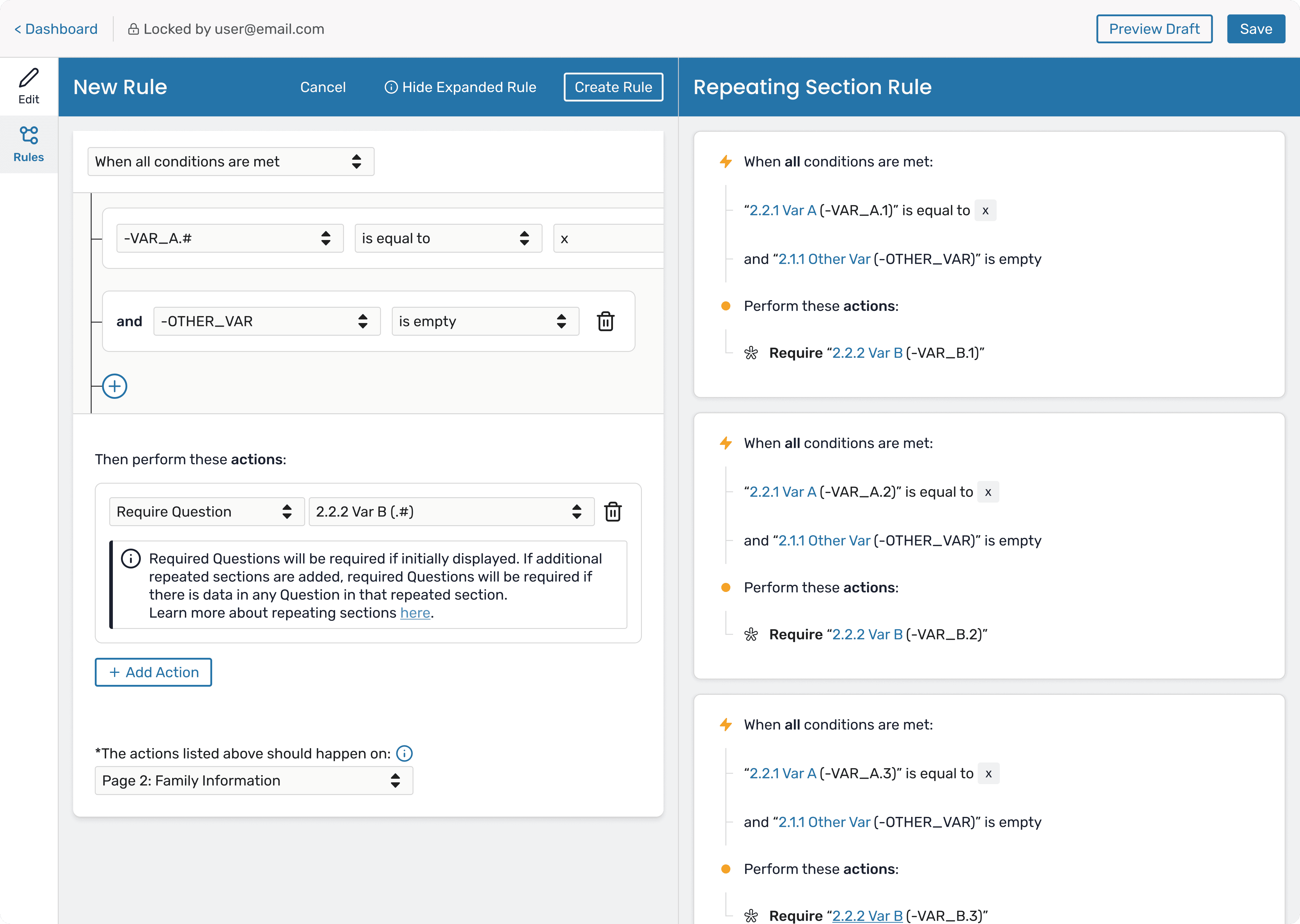
Designed “View Expanded Rule” to visually preview how .# rules (rules that repeat

for each iteration) apply to each repeated instance

Designed “View Expanded Rule” to visually preview how .# rules (rules that repeat for each iteration) apply to each repeated instance

Designed “View Expanded Rule” to visually preview how .# rules (rules that repeat for each iteration) apply to each repeated instance

Designed “View Expanded Rule” to visually preview how .# rules (rules that repeat

for each iteration) apply to each repeated instance

Designed “View Expanded Rule” to visually preview how .# rules (rules that

repeat for each iteration) apply to each repeated instance

Restricted .# rules (rules that repeat for each iteration) to elements within the

same repeating section to prevent ambiguity

Restricted .# rules (rules that repeat for each iteration) to elements within the same repeating section to prevent ambiguity

Restricted .# rules (rules that repeat for each iteration) to elements within the same repeating section to prevent ambiguity

Restricted .# rules (rules that repeat for each iteration) to elements within the

same repeating section to prevent ambiguity

Restricted .# rules (rules that repeat for each iteration) to elements within the

same repeating section to prevent ambiguity

This made complex logic transparent and predictable.

This made complex logic transparent and predictable.
This made complex logic transparent and predictable.
This made complex logic transparent and predictable.

This made complex logic transparent and predictable.

3. AUTOMATIC PREVENTION OF PARTIAL DATA

3. AUTOMATIC PREVENTION OF PARTIAL DATA

3. AUTOMATIC PREVENTION OF PARTIAL DATA

3. AUTOMATIC PREVENTION OF PARTIAL DATA

3. AUTOMATIC PREVENTION OF PARTIAL DATA

Problem: Optional repeated sections could be partially filled and submitted.

Problem: Optional repeated sections could be partially filled and submitted.

Problem: Optional repeated sections could be partially filled and submitted.

Problem: Optional repeated sections could be partially filled and submitted.

Problem: Optional repeated sections could be partially filled

and submitted.

Solution:

Solution:

Solution:

Solution:

Solution:

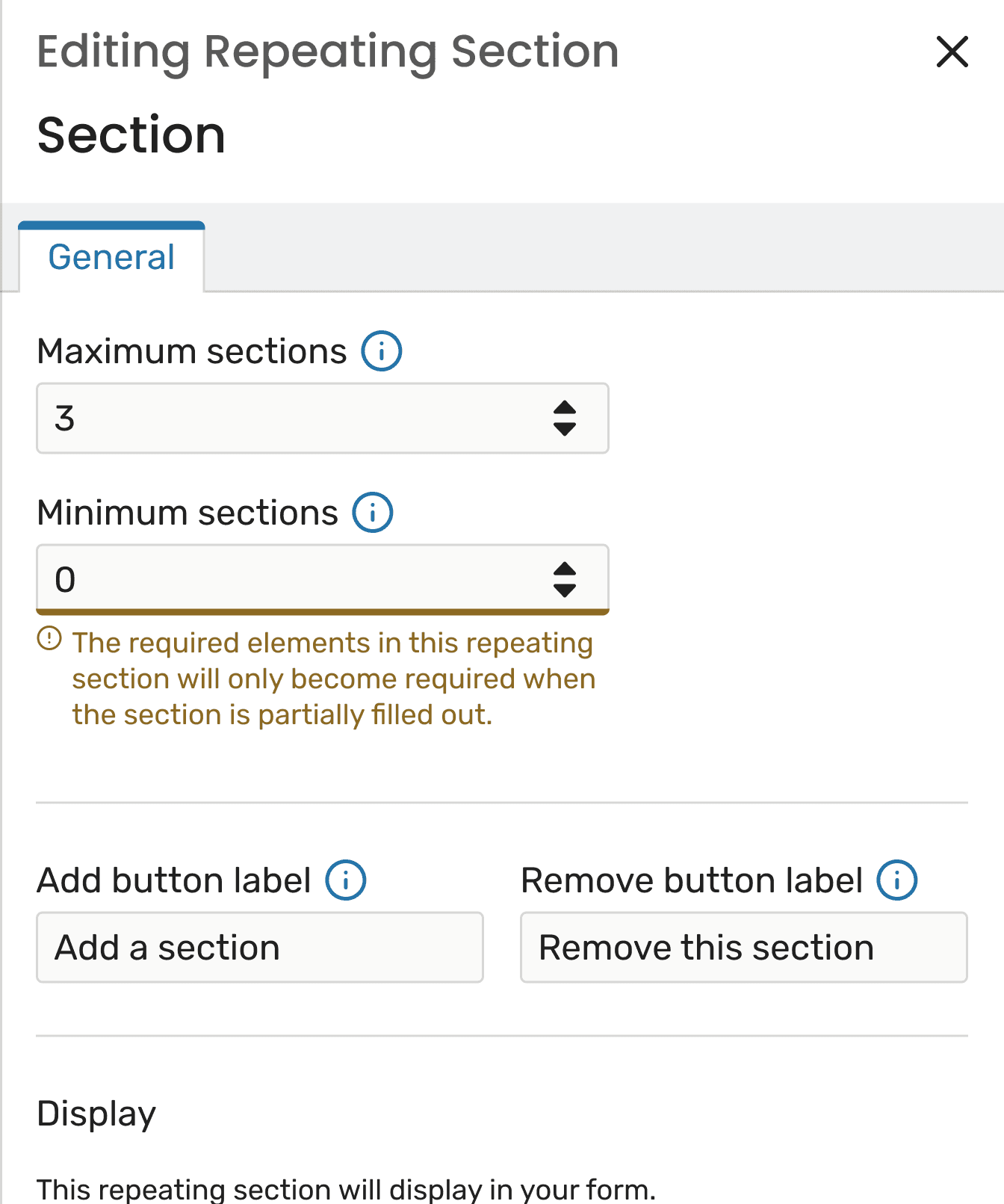
If an applicant enters data in an optional repeated section, required fields in

that section automatically become required

If an applicant enters data in an optional repeated section, required fields in that section automatically become required

If an applicant enters data in an optional repeated section, required fields in that section automatically become required

If an applicant enters data in an optional repeated section, required fields in

that section automatically become required

If an applicant enters data in an optional repeated section,

required fields in that section automatically become required

Applicants can still remove untouched optional sections

Applicants can still remove untouched optional sections

Applicants can still remove untouched optional sections

Applicants can still remove untouched optional sections

Applicants can still remove untouched optional sections

This logic is system-generated and hidden, keeping the UI clean ensuring system

consistency behind the scenes.

This logic is system-generated and hidden, keeping the UI clean ensuring system consistency behind the scenes.

This logic is system-generated and hidden, keeping the UI clean ensuring system consistency behind the scenes.

This logic is system-generated and hidden, keeping the UI clean ensuring

system consistency behind the scenes.

This logic is system-generated and hidden, keeping the UI clean

ensuring system consistency behind the scenes.

Impact

Impact

Impact

Impact

Impact

Reduced form-builder configuration errors

Reduced form-builder configuration errors

Reduced form-builder configuration errors

Reduced form-builder configuration errors

Reduced form-builder configuration errors

Improved confidence and comprehension around rules

Improved confidence and comprehension around rules

Improved confidence and comprehension around rules

Improved confidence and comprehension around rules

Improved confidence and comprehension around rules

Prevented incomplete submissions

Prevented incomplete submissions

Prevented incomplete submissions

Prevented incomplete submissions

Prevented incomplete submissions

Lowered support and maintenance burden

Lowered support and maintenance burden

Lowered support and maintenance burden

Lowered support and maintenance burden

Lowered support and maintenance burden

Takeaway

Takeaway

Takeaway

Takeaway

Takeaway

This project reinforced that removing options can be more

powerful than adding them. By simplifying mental models and

making hidden logic visible, Repeating Sections delivers

flexibility without complexity.

This project reinforced that removing options can be more powerful than adding them. By simplifying mental models and making hidden logic visible, Repeating Sections delivers flexibility without complexity.

This project reinforced that removing options can be more powerful than adding them. By simplifying mental models and making hidden logic visible, Repeating Sections delivers

flexibility without complexity.

This project reinforced that removing options can be more

powerful than adding them. By simplifying mental models and

making hidden logic visible, Repeating Sections delivers

flexibility without complexity.

This project reinforced that removing options can be more

powerful than adding them. By simplifying mental models and

making hidden logic visible, Repeating Sections delivers

flexibility without complexity.

Transactions

Transactions

Transactions

Transactions

Transactions

The Transactions Viewer project focused on designing and implementing a modern, user

friendly interface within the existing CRM to replace outdated systems and provide clients

with reliable access to raw form submission data, while integrating seamlessly with their

admissions processing workflows. The final product allows users to efficiently sort, filter,

organize, view, and export thousands of transactions generated across their institutions.

The Transactions Viewer project focused on designing and implementing a modern, user friendly interface within the existing CRM to replace outdated systems and provide clients with reliable access to raw form submission data, while integrating seamlessly with their admissions processing workflows. The final product allows users to efficiently sort, filter, organize, view, and export thousands of transactions generated across their institutions.

The Transactions Viewer project focused on designing and implementing a modern, user friendly interface within the existing CRM to replace outdated systems and provide clients with reliable access to raw form submission data, while integrating seamlessly with their admissions processing workflows. The final product allows users to efficiently sort, filter, organize, view, and export thousands of transactions generated across their institutions.

The Transactions Viewer project focused on designing and implementing a modern, user

friendly interface within the existing CRM to replace outdated systems and provide clients

with reliable access to raw form submission data, while integrating seamlessly with their

admissions processing workflows. The final product allows users to efficiently sort, filter,

organize, view, and export thousands of transactions generated across their institutions.

The Transactions Viewer project focused on designing and implementing a

modern, user friendly interface within the existing CRM to replace outdated

systems and provide clients with reliable access to raw form submission data,

while integrating seamlessly with their admissions processing workflows. The

final product allows users to efficiently sort, filter, organize, view, and export

thousands of transactions generated across their institutions.

The Challenge:

The Challenge:

The Challenge:

The Challenge:

The Challenge:

Designing Transactions required addressing several core challenges:

Designing Transactions required addressing several core challenges:

Designing Transactions required addressing several core challenges:

Designing Transactions required addressing several core challenges:

Designing Transactions required addressing several core challenges:

Establishing a clear definition of “transactions” within a CRM that aggregates

data from multiple legacy systems

Establishing a clear definition of “transactions” within a CRM that aggregates data from multiple legacy systems

Establishing a clear definition of “transactions” within a CRM that aggregates data from multiple legacy systems

Establishing a clear definition of “transactions” within a CRM that aggregates

data from multiple legacy systems

Establishing a clear definition of “transactions” within a CRM that aggregates

data from multiple legacy systems

Delivering a performant experience, even for institutions with hundreds of

thousands of transaction records

Delivering a performant experience, even for institutions with hundreds of thousands of transaction records

Delivering a performant experience, even for institutions with hundreds of thousands of transaction records

Delivering a performant experience, even for institutions with hundreds of

thousands of transaction records

Delivering a performant experience, even for institutions with hundreds of

thousands of transaction records

Accommodating fundamentally different workflows for submitted versus in

progress transactions without conflating their meaning or behavior

Accommodating fundamentally different workflows for submitted versus in progress transactions without conflating their meaning or behavior

Accommodating fundamentally different workflows for submitted versus in progress transactions without conflating their meaning or behavior

Accommodating fundamentally different workflows for submitted versus in

progress transactions without conflating their meaning or behavior

Accommodating fundamentally different workflows for submitted versus in

progress transactions without conflating their meaning or behavior

Creating intuitive pathways between transactions and core CRM records, such as

profiles and applications

Creating intuitive pathways between transactions and core CRM records, such as profiles and applications

Creating intuitive pathways between transactions and core CRM records, such as profiles and applications

Creating intuitive pathways between transactions and core CRM records, such as

profiles and applications

Creating intuitive pathways between transactions and core CRM records, such as

profiles and applications

Sophisticated Filtering Requirements: Users required robust capabilities to

quickly find specific transactions, necessitating advanced filtering options

using date ranges, custom form fields, status, and complex combined criteria

(nested conditions).

Sophisticated Filtering Requirements: Users required robust capabilities to quickly find specific transactions, necessitating advanced filtering options using date ranges, custom form fields, status, and complex combined criteria (nested conditions).
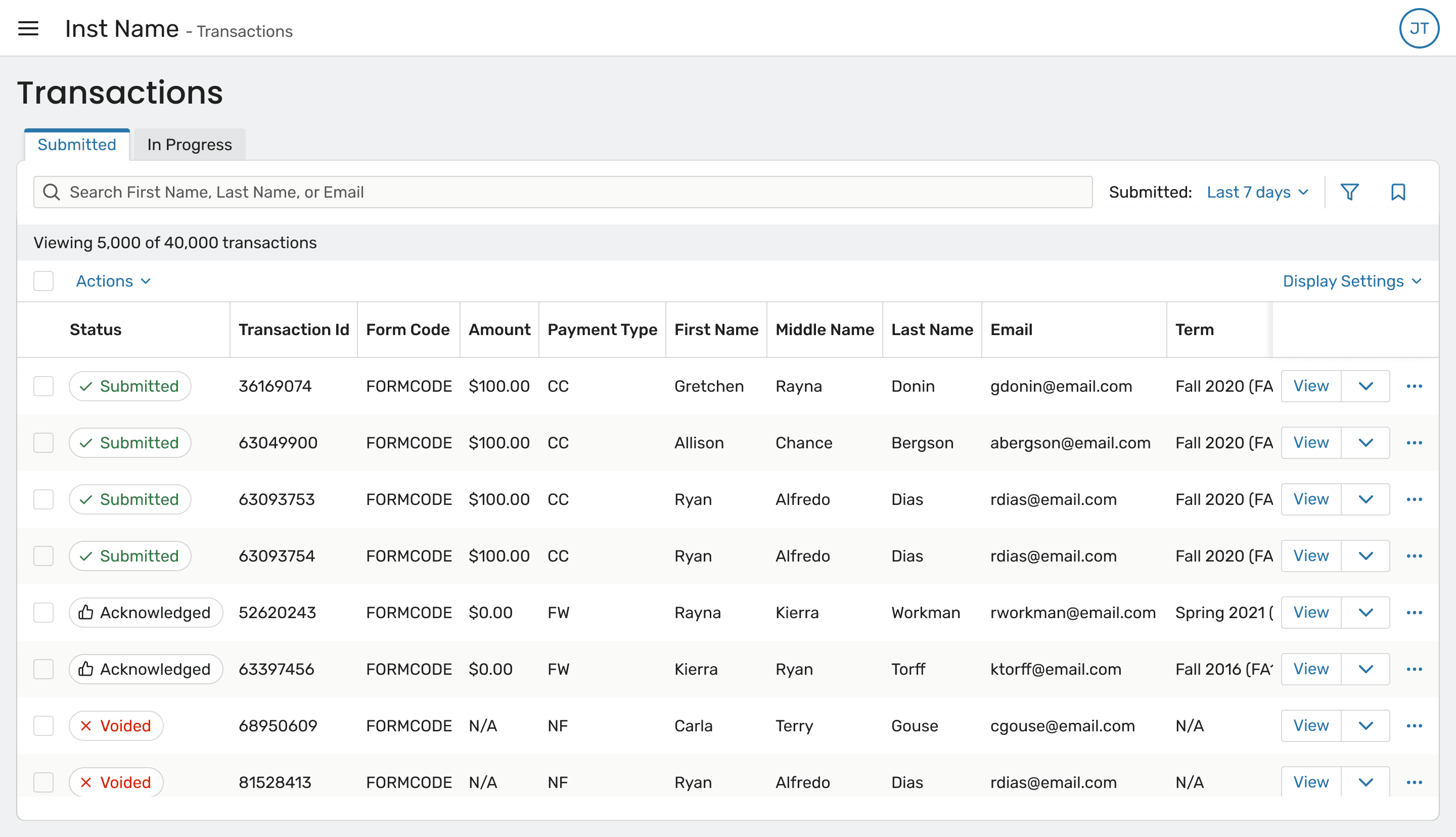
Sophisticated Filtering Requirements: Users required robust capabilities to quickly find specific transactions, necessitating advanced filtering options using date ranges, custom form fields, status, and complex combined criteria (nested conditions).

Sophisticated Filtering Requirements: Users required robust capabilities to

quickly find specific transactions, necessitating advanced filtering options

using date ranges, custom form fields, status, and complex combined criteria

(nested conditions).

Sophisticated Filtering Requirements: Users required robust capabilities to

quickly find specific transactions, necessitating advanced filtering options

using date ranges, custom form fields, status, and complex combined criteria

(nested conditions).

Key Design Solutions:

Key Design Solutions:

Key Design Solutions:

Key Design Solutions:

Key Design Solutions:

1. ESTABLISHING RECORD RELATIONSHIPS AND NAVIGATION

1. ESTABLISHING RECORD RELATIONSHIPS AND NAVIGATION

1. ESTABLISHING RECORD RELATIONSHIPS AND NAVIGATION

1. ESTABLISHING RECORD RELATIONSHIPS AND NAVIGATION

1. ESTABLISHING RECORD RELATIONSHIPS AND NAVIGATION

Problem: Because transaction data originated in legacy systems, it was not always

obvious how to trace a transaction back to a person or application within the CRM.

This

made it difficult for users to move from “what happened” to “who did this belong to?”


Solution: The Transactions Viewer includes multiple navigation affordances:

Problem: Because transaction data originated in legacy systems, it was not always obvious how to trace a transaction back to a person or application within the CRM.

This made it difficult for users to move from “what happened” to “who did this belong to?”


Solution: The Transactions Viewer includes multiple navigation affordances:

Problem: Because transaction data originated in legacy systems, it was not always obvious how to trace a transaction back to a person or application within the CRM.

This made it difficult for users to move from “what happened” to “who did this belong to?”


Solution: The Transactions Viewer includes multiple navigation affordances:

Problem: Because transaction data originated in legacy systems, it was not always

obvious how to trace a transaction back to a person or application within the CRM.

This made it difficult for users to move from “what happened” to “who did this

belong to?”


Solution: The Transactions Viewer includes multiple navigation affordances:

Problem: Because transaction data originated in legacy systems, it was not always

obvious how to trace a transaction back to a person or application within the CRM.

This made it difficult for users to move from “what happened” to “who did this

belong to?”


Solution: The Transactions Viewer includes multiple navigation affordances:

Direct links from a transaction to its corresponding Application Record (Admit)

Direct links from a transaction to its corresponding Application Record (Admit)

Direct links from a transaction to its corresponding Application Record (Admit)

Direct links from a transaction to its corresponding Application Record (Admit)

Direct links from a transaction to its corresponding Application Record (Admit)

Direct links to the Profile Record (Prospect)

Direct links to the Profile Record (Prospect)

Direct links to the Profile Record (Prospect)

Direct links to the Profile Record (Prospect)

Direct links to the Profile Record (Prospect)

An optional Profile ID column to help users visually identify transactions

belonging to the same person
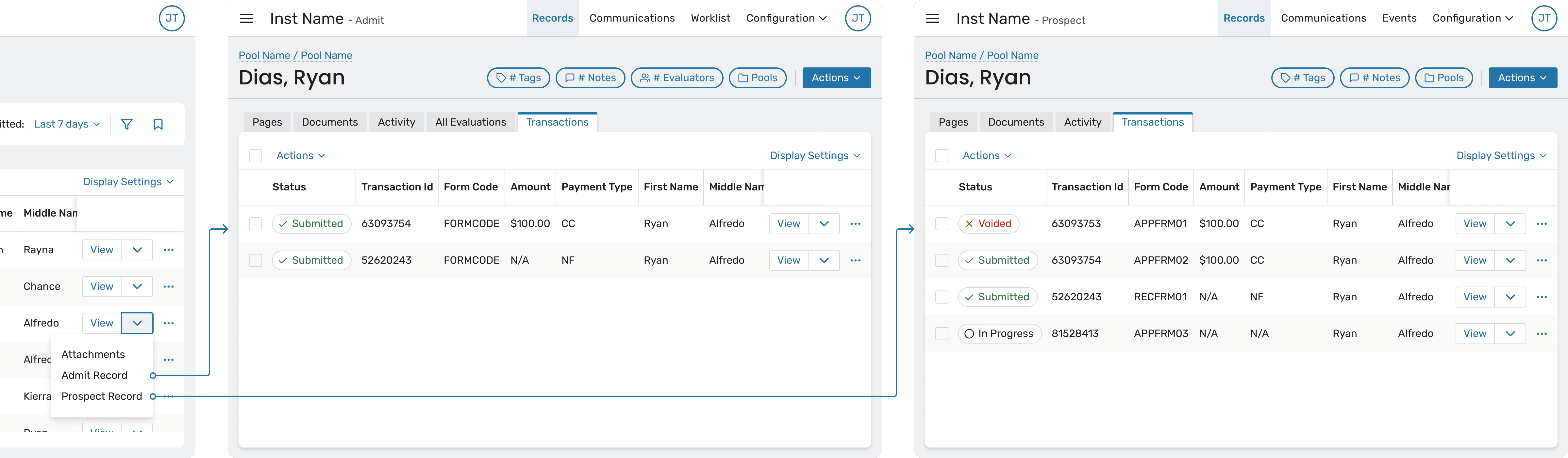
An optional Profile ID column to help users visually identify transactions belonging to the same person

An optional Profile ID column to help users visually identify transactions belonging to the same person

An optional Profile ID column to help users visually identify transactions

belonging to the same person

An optional Profile ID column to help users visually identify transactions

belonging to the same person

2. DESIGNING POWERFUL FILTERING AND BOOKMARKING

2. DESIGNING POWERFUL FILTERING AND BOOKMARKING

2. DESIGNING POWERFUL FILTERING AND BOOKMARKING

2. DESIGNING POWERFUL FILTERING AND BOOKMARKING

2. DESIGNING POWERFUL FILTERING AND BOOKMARKING

Problem: Users need to repeatedly search transaction data using the same criteria –

often across multiple sessions or workflows (e.g., “Submitted applications for

Program X this week” or “In-progress transactions awaiting payment”). Without saved

views, users were forced to rebuild complex filters each time, which was both time

consuming and error-prone.

Additionally, filtering had to balance power and performance. With large datasets,

overly flexible or unclear filtering patterns risked slow queries and user confusion

about what data was actually being returned.

Problem: Users need to repeatedly search transaction data using the same criteria – often across multiple sessions or workflows (e.g., “Submitted applications for Program X this week” or “In-progress transactions awaiting payment”). Without saved views, users were forced to rebuild complex filters each time, which was both time-consuming and error-prone.


Additionally, filtering had to balance power and performance. With large datasets, overly flexible or unclear filtering patterns risked slow queries and user confusion about what data was actually being returned.

Problem: Users need to repeatedly search transaction data using the same criteria – often across multiple sessions or workflows (e.g., “Submitted applications for Program X this week” or “In-progress transactions awaiting payment”). Without saved views, users were forced to rebuild complex filters each time, which was both time-consuming and error-prone.


Additionally, filtering had to balance power and performance. With large datasets, overly flexible or unclear filtering patterns risked slow queries and user confusion about what data was actually being returned.

Problem: Users need to repeatedly search transaction data using the same criteria

– often across multiple sessions or workflows (e.g., “Submitted applications for

Program X this week” or “In-progress transactions awaiting payment”). Without

saved views, users were forced to rebuild complex filters each time, which was both

time consuming and error-prone.

Additionally, filtering had to balance power and performance. With large datasets,

overly flexible or unclear filtering patterns risked slow queries and user confusion

about what data was actually being returned.

Problem: Users need to repeatedly search transaction data using the same criteria–

often across multiple sessions or workflows (e.g., “Submitted applications for

Program X this week” or “In-progress transactions awaiting payment”). Without

saved views, users were forced to rebuild complex filters each time, which was both

time consuming and error-prone.

Additionally, filtering had to balance power and performance. With large datasets,

overly flexible or unclear filtering patterns risked slow queries and user confusion

about what data was actually being returned.

Solution: The Transactions Viewer was designed with a clear filtering hierarchy and

bookmarkable views to support repeatable workflows:

Solution: The Transactions Viewer was designed with a clear filtering hierarchy and bookmarkable views to support repeatable workflows:

Solution: The Transactions Viewer was designed with a clear filtering hierarchy and bookmarkable views to support repeatable workflows:

Solution: The Transactions Viewer was designed with a clear filtering hierarchy and

bookmarkable views to support repeatable workflows:

Solution: The Transactions Viewer was designed with a clear filtering hierarchy and

bookmarkable views to support repeatable workflows:

Primary Date Filter as a First-Class Control

A prominent date range filter sits next to the search bar, acting as the first and

most important constraint on the dataset. This ensures performant queries by

default and sets clear expectations about result size before users apply

additional filters.

Primary Date Filter as a First-Class Control

A prominent date range filter sits next to the search bar, acting as the first and most important constraint on the dataset. This ensures performant queries by default and sets clear expectations about result size before users apply additional filters.

Primary Date Filter as a First-Class Control

A prominent date range filter sits next to the search bar, acting as the first and most important constraint on the dataset. This ensures performant queries by default and sets clear expectations about result size before users apply additional filters.

Primary Date Filter as a First-Class Control

A prominent date range filter sits next to the search bar, acting as the first and

most important constraint on the dataset. This ensures performant queries by

default and sets clear expectations about result size before users apply

additional filters.

Primary Date Filter as a First-Class Control

A prominent date range filter sits next to the search bar, acting as the first and

most important constraint on the dataset. This ensures performant queries by

default and sets clear expectations about result size before users apply

additional filters.

Advanced Filter Builder for Precision

Additional filters (form, status, program, etc.) are available through a structured

filter builder, allowing users to progressively narrow results without overwhelming

the initial interface.

Advanced Filter Builder for Precision

Additional filters (form, status, program, etc.) are available through a structured filter builder, allowing users to progressively narrow results without overwhelming the initial interface.

Advanced Filter Builder for Precision

Additional filters (form, status, program, etc.) are available through a structured filter builder, allowing users to progressively narrow results without overwhelming the initial interface.

Advanced Filter Builder for Precision

Additional filters (form, status, program, etc.) are available through a structured

filter builder, allowing users to progressively narrow results without overwhelming

the initial interface.

Advanced Filter Builder for Precision

Additional filters (form, status, program, etc.) are available through a structured

filter builder, allowing users to progressively narrow results without

overwhelming the initial interface.

Bookmarkable Filter States

Filter configurations can be bookmarked, enabling users to save and quickly

return to frequently used transaction views. This supports common operational

workflows and reduces repetitive setup, especially for power users who monitor

transactions daily.

Bookmarkable Filter States

Filter configurations can be bookmarked, enabling users to save and quickly return to frequently used transaction views. This supports common operational workflows and reduces repetitive setup, especially for power users who monitor transactions daily.

Bookmarkable Filter States

Filter configurations can be bookmarked, enabling users to save and quickly return to frequently used transaction views. This supports common operational workflows and reduces repetitive setup, especially for power users who monitor transactions daily.

Bookmarkable Filter States

Filter configurations can be bookmarked, enabling users to save and quickly

return to frequently used transaction views. This supports common operational

workflows and reduces repetitive setup, especially for power users who monitor

transactions daily.

Bookmarkable Filter States

Filter configurations can be bookmarked, enabling users to save and quickly

return to frequently used transaction views. This supports common operational

workflows and reduces repetitive setup, especially for power users who monitor

transactions daily.

Explicit Scope and Transparency

Each bookmarked or active filter state reflects only Apply Web transactions,

reinforcing data trust and preventing confusion about what data is included in

saved views.

Explicit Scope and Transparency

Each bookmarked or active filter state reflects only Apply Web transactions, reinforcing data trust and preventing confusion about what data is included in saved views.

Explicit Scope and Transparency

Each bookmarked or active filter state reflects only Apply Web transactions, reinforcing data trust and preventing confusion about what data is included in saved views.

Explicit Scope and Transparency

Each bookmarked or active filter state reflects only Apply Web transactions,

reinforcing data trust and preventing confusion about what data is included in

saved views.

Explicit Scope and Transparency

Each bookmarked or active filter state reflects only Apply Web transactions,

reinforcing data trust and preventing confusion about what data is included in

saved views.

By pairing performant defaults with bookmarkable filters, the system supports both
one-off investigation and ongoing, repeatable workflows, which is critical for high
volume admissions and administrative teams.

By pairing performant defaults with bookmarkable filters, the system supports both one-off investigation and ongoing, repeatable workflows, which is critical for high-volume admissions and administrative teams.
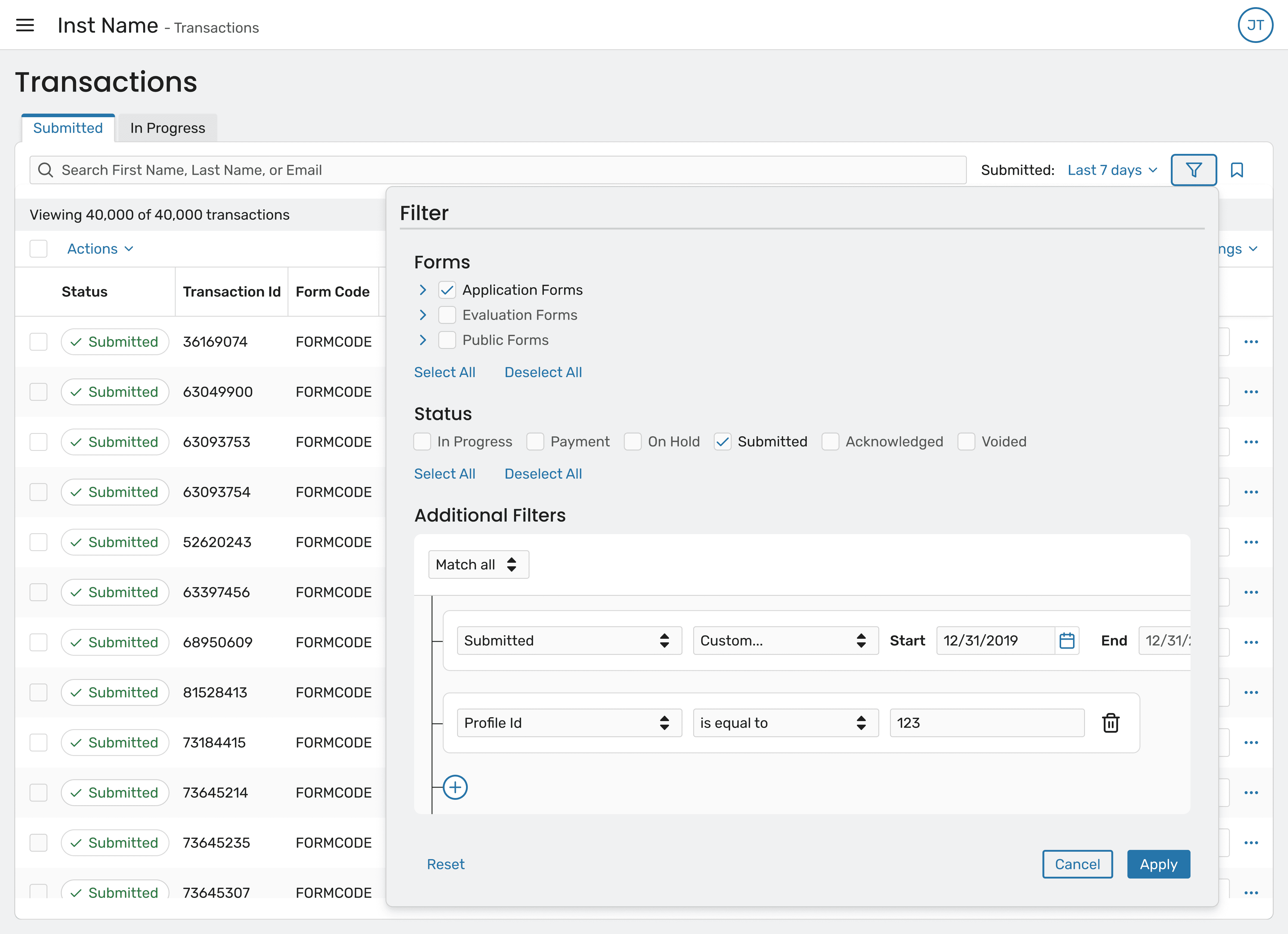
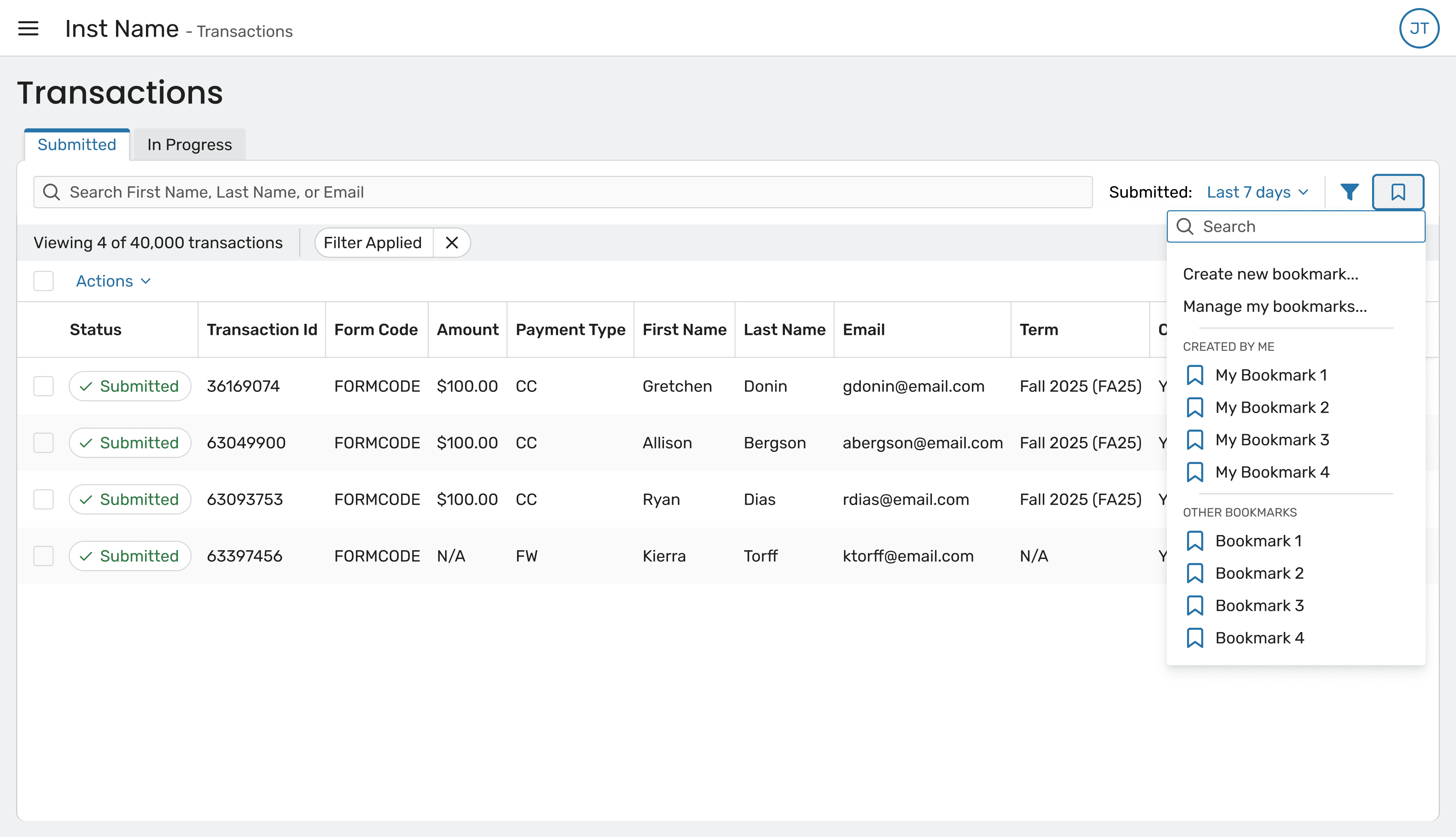
By pairing performant defaults with bookmarkable filters, the system supports both one-off investigation and ongoing, repeatable workflows, which is critical for high-volume admissions and administrative teams.

By pairing performant defaults with bookmarkable filters, the system supports both

one-off investigation and ongoing, repeatable workflows, which is critical for high

volume admissions and administrative teams.

By pairing performant defaults with bookmarkable filters, the system supports both
one-off investigation and ongoing, repeatable workflows, which is critical for high
volume admissions and administrative teams.

Impact

Impact

Impact

Impact

Impact

Delivered a performant default experience for large datasets

Delivered a performant default experience for large datasets

Delivered a performant default experience for large datasets

Delivered a performant default experience for large datasets

Delivered a performant default experience for large datasets

Reduced ambiguity around transaction data scope

Reduced ambiguity around transaction data scope

Reduced ambiguity around transaction data scope

Reduced ambiguity around transaction data scope

Reduced ambiguity around transaction data scope

Supported real-world operational workflows with saved views

Supported real-world operational workflows with saved views

Supported real-world operational workflows with saved views

Supported real-world operational workflows with saved views

Supported real-world operational workflows with saved views

Takeaway

Takeaway

Takeaway

Takeaway

Takeaway

The Transactions Viewer reinforced the importance of clear

boundaries in complex systems. Rather than attempting to unify

all data at once, we prioritized correctness, performance, and

trust. Many of the strongest design decisions came from saying

“no” to ambiguity and designing explicitly around technical

realities instead of abstract ideals.

The Transactions Viewer reinforced the importance of clear boundaries in complex systems. Rather than attempting to unify all data at once, we prioritized correctness, performance, and trust. Many of the strongest design decisions came from saying “no” to ambiguity and designing explicitly around technical realities instead of abstract ideals.

The Transactions Viewer reinforced the importance of clear boundaries in complex systems. Rather than attempting to unify all data at once, we prioritized correctness, performance, and trust. Many of the strongest design decisions came from saying “no” to ambiguity and designing explicitly around technical realities instead of abstract ideals.

The Transactions Viewer reinforced the importance of clear

boundaries in complex systems. Rather than attempting to unify

all data at once, we prioritized correctness, performance, and

trust. Many of the strongest design decisions came from saying

“no” to ambiguity and designing explicitly around technical

realities instead of abstract ideals.

The Transactions Viewer reinforced the importance of clear

boundaries in complex systems. Rather than attempting to

unify all data at once, we prioritized correctness, performance,

and trust. Many of the strongest design decisions came from

saying “no” to ambiguity and designing explicitly around

technical realities instead of abstract ideals.

Design System

Design System

Design System

Design System

Design System

When I joined, the design system existed primarily in Figma but was loosely aligned with

production code. This gap led to frequent component detachment, and inconsistent behavior

between design and implementation.

When I joined, the design system existed primarily in Figma but was loosely aligned with production code. This gap led to frequent component detachment, and inconsistent behavior between design and implementation.

When I joined, the design system existed primarily in Figma but was loosely aligned with production code. This gap led to frequent component detachment, and inconsistent behavior between design and implementation.

When I joined, the design system existed primarily in Figma but was loosely aligned with

production code. This gap led to frequent component detachment, and inconsistent behavior

between design and implementation.

When I joined, the design system existed primarily in Figma but was loosely

aligned with production code. This gap led to frequent component detachment,

and inconsistent behavior between design and implementation.

I led efforts to realign Figma components with their coded counterparts, updating

structure and behaviors so designers could work more confidently within the system

rather than around it. This reduced the need for detaching components and

improved consistency from design through development.

In parallel, I took ownership of maintaining and evolving the design system, ensuring

it stayed current as the product and codebase changed. I introduced and managed

Figma variables, refactoring existing components to use shared tokens for color,

spacing, and typography – laying the groundwork for scalability and theming.

As part of this work, I also was working on a redesigned client-facing dark mode. The

existing dark mode had been internal-only and lacked refinement, so I improved

contrast, accessibility, and visual consistency to meet production standards.

I led efforts to realign Figma components with their coded counterparts, updating structure and behaviors so designers could work more confidently within the system rather than around it. This reduced the need for detaching components and improved consistency from design through development.


In parallel, I took ownership of maintaining and evolving the design system, ensuring it stayed current as the product and codebase changed. I introduced and managed Figma variables, refactoring existing components to use shared tokens for color, spacing, and typography – laying the groundwork for scalability and theming.


As part of this work, I also was working on a redesigned client-facing dark mode. The existing dark mode had been internal-only and lacked refinement, so I improved contrast, accessibility, and visual consistency to meet production standards.
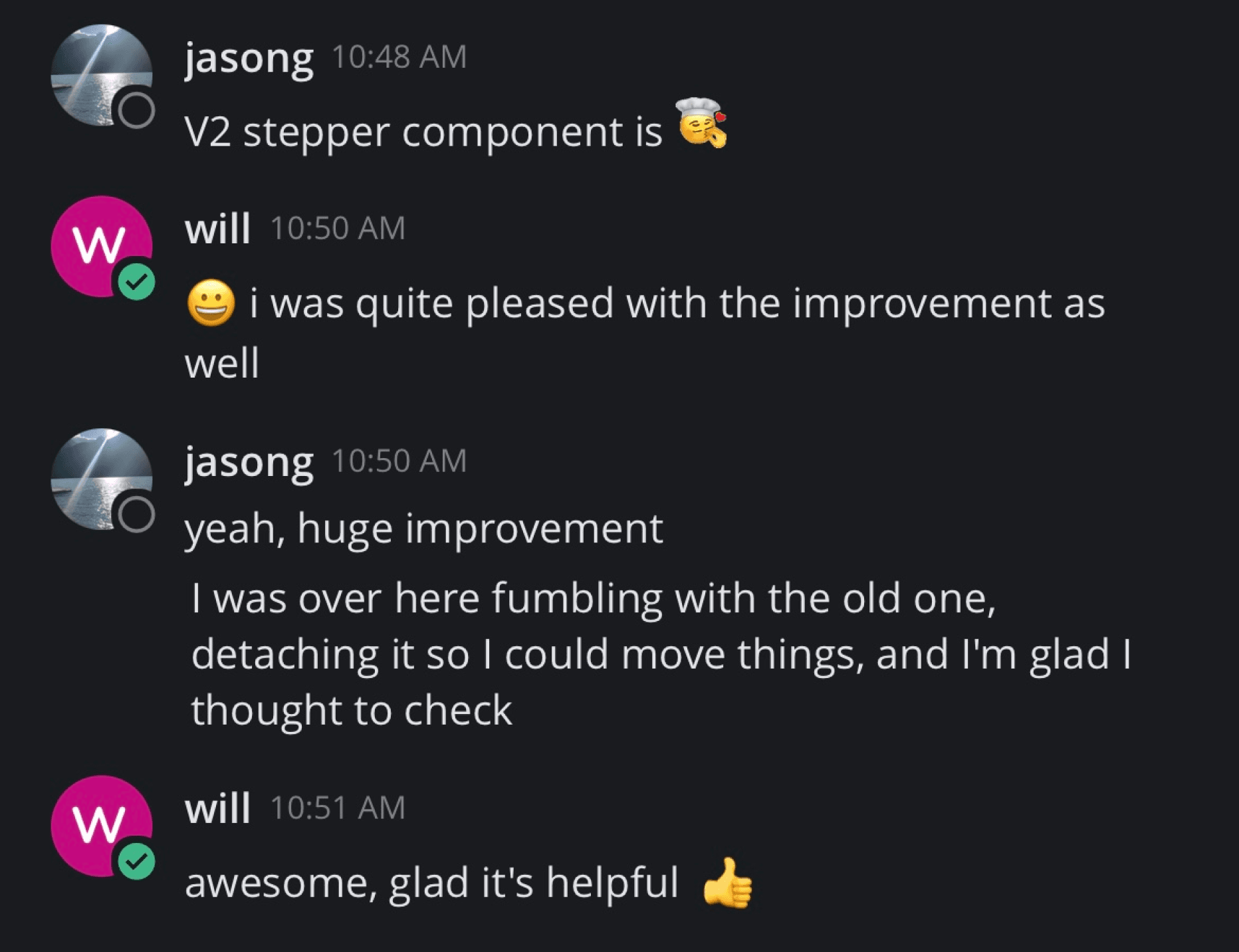
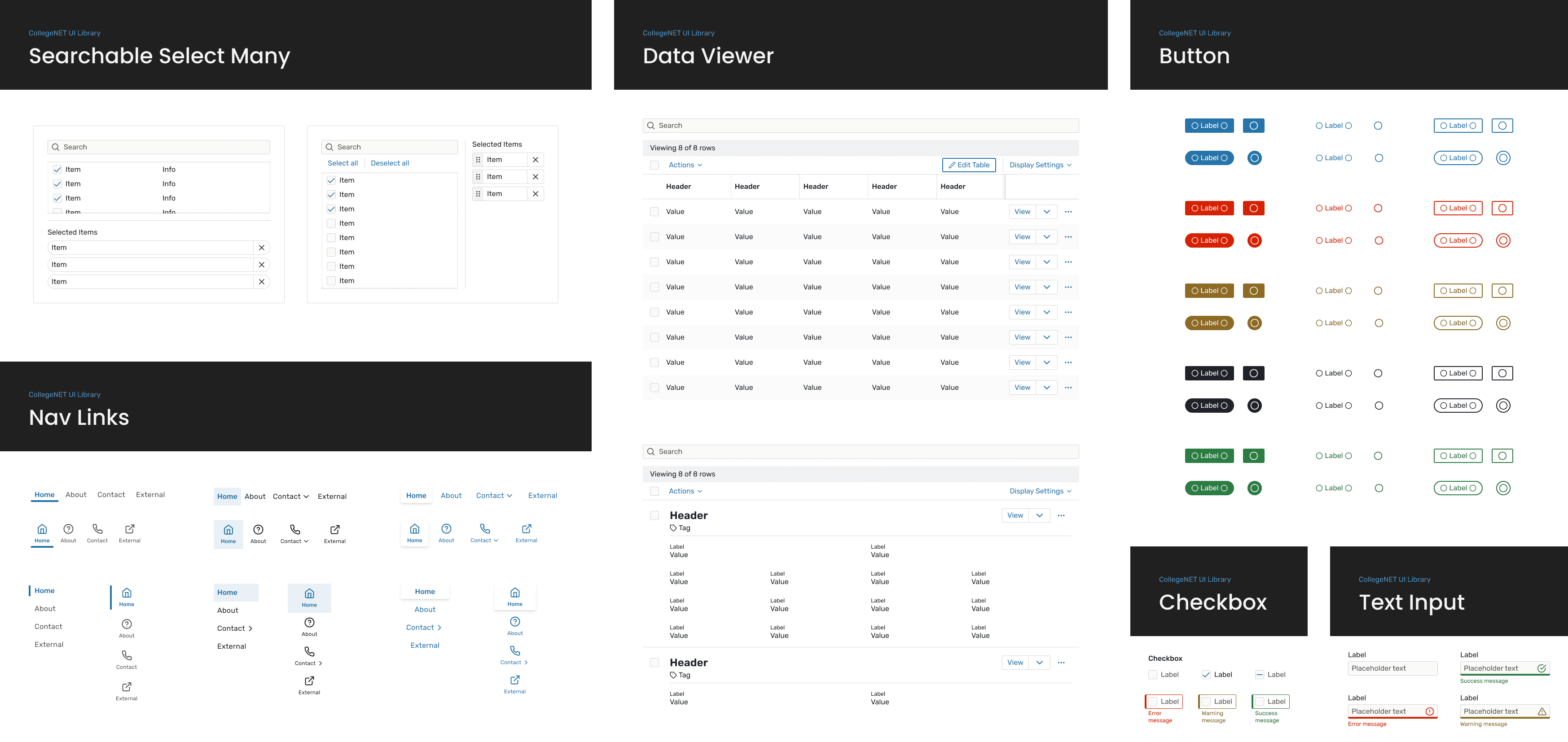
I led efforts to realign Figma components with their coded counterparts, updating structure and behaviors so designers could work more confidently within the system rather than around it. This reduced the need for detaching components and improved consistency from design through development.


In parallel, I took ownership of maintaining and evolving the design system, ensuring it stayed current as the product and codebase changed. I introduced and managed Figma variables, refactoring existing components to use shared tokens for color, spacing, and typography – laying the groundwork for scalability and theming.


As part of this work, I also was working on a redesigned client-facing dark mode. The existing dark mode had been internal-only and lacked refinement, so I improved contrast, accessibility, and visual consistency to meet production standards.

I led efforts to realign Figma components with their coded counterparts, updating

structure and behaviors so designers could work more confidently within the system

rather than around it. This reduced the need for detaching components and

improved consistency from design through development.


In parallel, I took ownership of maintaining and evolving the design system, ensuring

it stayed current as the product and codebase changed. I introduced and managed

Figma variables, refactoring existing components to use shared tokens for color,

spacing, and typography – laying the groundwork for scalability and theming.


As part of this work, I also was working on a redesigned client-facing dark mode. The

existing dark mode had been internal-only and lacked refinement, so I improved

contrast, accessibility, and visual consistency to meet production standards.

I led efforts to realign Figma components with their

coded counterparts, updating structure and behaviors

so designers could work more confidently within the

system rather than around it. This reduced the need for

detaching components and improved consistency from

design through development.


In parallel, I took ownership of maintaining and evolving

the design system, ensuring it stayed current as the

product and codebase changed. I introduced and

managed Figma variables, refactoring existing

components to use shared tokens for color, spacing,

and typography – laying the groundwork for scalability

and theming.


As part of this work, I also was working on a redesigned

client-facing dark mode. The existing dark mode had

been internal-only and lacked refinement, so I improved

contrast, accessibility, and visual consistency to meet

production standards.

Additional Features and Improvements

Additional Features and Improvements

Additional Features and Improvements

Additional Features and Improvements

Additional Features and Improvements

A selection of other features, refinements, and UX improvements I worked on across the platform.

A selection of other features, refinements, and UX improvements I worked on across the platform.
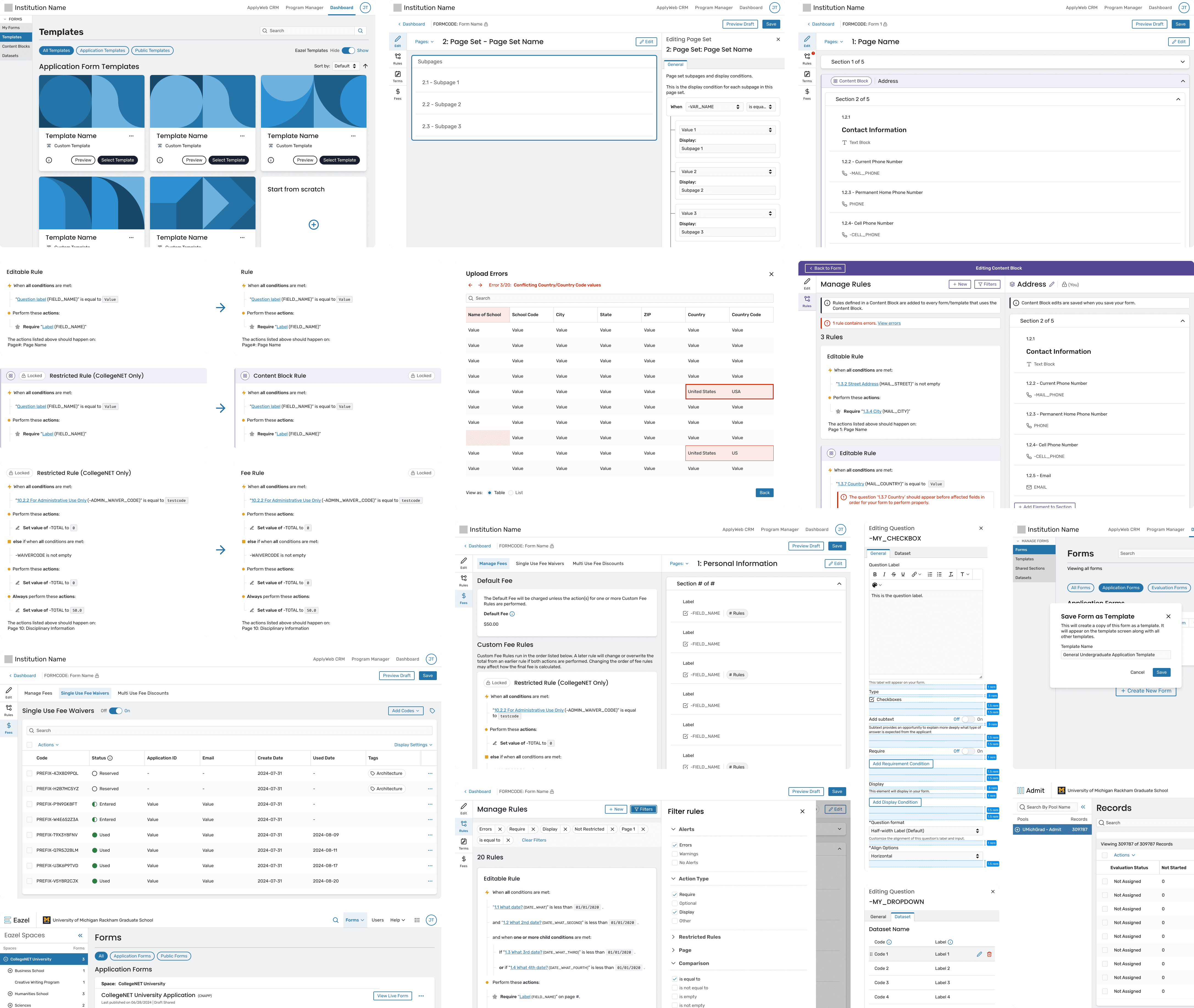
A selection of other features, refinements, and UX improvements I worked on across the platform.

A selection of other features, refinements, and UX improvements I worked on across the platform.

A selection of other features, refinements, and
UX improvements I worked on across the platform.